Metaballs and Marching Squares: Rendering Gooey 2D Blobs
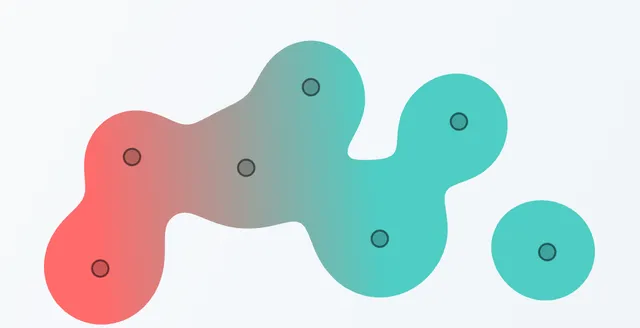
Metaballs (or “blobs”) are organic-looking shapes that smoothly merge and separate — think lava lamps, water droplets, or those gooey UI effects you see in modern web design. In this post, we’ll explore how to render 2D metaballs using the marching squares algorithm.
Try It Out
Drag the control points below to see the metaballs merge and separate. The physics simulation gives them that satisfying springy motion:
The Concept
Before diving into the math, think of a candle flame. Close to the wick, it’s hot. As you move away, the heat drops off. If you bring two candles close together, the heat fields between them merge, creating a combined zone of warmth that connects them.
Metaballs work the same way:
- Field of Influence: Each blob emits a “field” that is strong at the center and weak at the edges.
- Threshold: We decide to draw a line exactly where the combined field strength equals a specific value (e.g., 1.0).
When two blobs are far apart, their fields don’t overlap enough to reach that threshold in the middle, so they look like separate circles. As they get closer, the fields add up, pushing the threshold boundary outward and creating a bridge between them.
The Math
To simulate this “field of influence,” we use an equation that mimics gravity or light intensity — the Inverse Square Law.
The strength (“potential”) of the field at any pixel is the sum of the influence from all blobs:
Where:
- is the radius of blob (how “hot” it is).
- is the distance from the pixel to the center of blob .
If the total potential at a pixel is , it’s inside the blob. If it’s , it’s outside. The “gooey” surface exists exactly where the potential equals .
The Marching Squares Algorithm
We have a mathematical definition of our blobs, but how do we draw them? We can’t check every single pixel on the screen — that would be too slow. Instead, we use Marching Squares, an algorithm designed to find contours (outlines).
Think of it like drawing a topographic map. You measure the elevation at regular intervals, and then you draw lines where the elevation crosses a specific height (like 1000ft).
How It Works
-
Grid Sampling: We divide the screen into a coarse grid (e.g., 10x10 pixel squares). We calculate the field strength only at the corners of these squares.
-
Binary Classification: For each square, we look at its four corners. Is the corner “inside” (hot) or “outside” (cold)?
- Inside = 1
- Outside = 0
This gives us 4 corners, meaning there are possible patterns for how the surface might cut through that square.
-
Lookup Table: We use a lookup table to decide how to draw the lines for each of those 16 cases.
Case 0: ○ ○ Case 5: ○ ● Case 10: ● ○ ○ ○ ● ○ ○ ● (empty) (saddle) (saddle) -
Linear Interpolation: To make the shape smooth, we don’t just connect the midpoints. If one corner is very hot (2.5) and the other is barely cold (0.9), the surface line should be much closer to the cold corner. We interpolate the exact position along the edge.
function lerp(x1, y1, x2, y2, v1, v2, threshold) {
  const t = (threshold - v1) / (v2 - v1);
  return {
    x: x1 + t * (x2 - x1),
    y: y1 + t * (y2 - y1)
  };
}
The Implementation
Here is a simplified look at the loop that drives the algorithm:
function generateIsolines(
  field: (x: number, y: number) => number,
  bounds: Bounds,
  resolution: number,
  threshold: number
): Point[][] {
  // 1. Pre-compute grid values
  const grid = new Float32Array(gridWidth * gridHeight);
  for (let y = 0; y < gridHeight; y++) {
    for (let x = 0; x < gridWidth; x++) {
      grid[y * gridWidth + x] = field(px, py);
    }
  }

  // 2. March through each cell
  for (let y = 0; y < rows; y++) {
    for (let x = 0; x < cols; x++) {
      // Get corner values
      const v0 = grid[y * gridWidth + x];       // top-left
      const v1 = grid[y * gridWidth + x + 1];   // top-right
      const v2 = grid[(y+1) * gridWidth + x + 1]; // bottom-right
      const v3 = grid[(y+1) * gridWidth + x];   // bottom-left

      // Build 4-bit index (0-15)
      let index = 0;
      if (v0 >= threshold) index |= 8;
      if (v1 >= threshold) index |= 4;
      if (v2 >= threshold) index |= 2;
      if (v3 >= threshold) index |= 1;

      // 3. Lookup case & add segments...
      // (Implementation detail: retrieve edges from lookup table)
    }
  }

  return connectSegments(segments);
}
Performance Optimizations
The demo above runs at 60fps even with multiple blobs. Simulation at this speed requires being smart about what we calculate:
- Pre-computed Grid: We sample the field once per frame at grid corners, rather than re-calculating per edge.
- Edge Caching: The right edge of cell
(x, y)is the same as the left edge of cell(x+1, y). We cache these interpolation results to avoid duplicate work. - TypedArrays: Using
Float32Arrayfor the grid data is significantly faster than standard JavaScript arrays due to memory locality. - Bounded Sampling: We calculate the bounding box of all blobs and only run the marching squares algorithm within that active area, skipping the empty space around them.
Color Blending
The gradient effect that blends colors when metaballs merge uses the same distance data. We calculate a “blend factor” based on how close the blobs are:
const dist = Math.sqrt(dx * dx + dy * dy);
// 200px is our "interaction radius"
const blendFactor = Math.min(dist / 200, 1);

// Full separation: distinct colors
// Close together: mixed color
const c1 = lerpColor(mixedColor, color1, blendFactor);
const c2 = lerpColor(mixedColor, color2, blendFactor);
Going Further
The marching squares algorithm is a foundational technique in computer graphics:
- Terrain contours: Generating topographic maps from height data.
- Image segmentation: Computer vision tasks to outline objects.
- Fluid simulation: Visualizing 2D liquid dynamics.
- UI effects: Creating organic transitional interfaces.